
How to Choose and Implement a PIM System
Last updated: 13 November 2026
Choosing a Product Information Management (PIM) system starts with understanding your products, your people and the information you need to deliver. A useful evaluation looks beyond software features to the workflows, integrations and ongoing responsibilities that will make the system work.
This guide outlines a practical approach for manufacturers, distributors and wholesalers: define the problem, test platforms against real requirements, and introduce PIM in manageable stages.
If you are new to the topic, start with our introduction to what Product Information Management is and how it works.
1. Define the problem you want PIM to solve
Before comparing platforms, identify where product information creates unnecessary work or limits your business.
Common examples include:
- Product launches delayed by missing specifications, images or approvals
- Different information appearing on websites, datasheets and distributor systems
- Repeated manual preparation of customer or channel exports
- Product variants, accessories and spare parts managed in separate spreadsheets
- Difficulty maintaining content for several brands, markets or languages
Choose a small number of outcomes for the first stage. For example, you might aim to publish one product range to your website and produce a consistent distributor export from the same approved records.
Record how the process works today. Useful baseline measures include time spent preparing exports, time needed to publish a product, and the number of records missing required information.
2. Map your product data and its sources
List where product information comes from, who maintains it and where it needs to go. Include ERP records, supplier spreadsheets, shared folders, existing websites and any specialist systems.
For each important field, establish an authoritative source and an owner. For example:
- Product codes: maintained in ERP and imported into PIM
- Technical specifications: maintained by the product team, using verified supplier or engineering information
- Marketing descriptions: maintained and approved by marketing
- Images and manuals: managed in DAM and linked to the relevant products
- Stock and customer pricing: supplied by ERP to the channels that need them
Deciding these responsibilities early helps prevent conflicting updates and unclear ownership after launch.
3. Define requirements using real products
A feature checklist is useful, but representative product records reveal whether a platform can support your actual business.
Select examples that cover both everyday products and difficult cases. These might include a simple item, a product with many variants, a spare part linked to several models, and an item with different documentation requirements across markets.
Product structure
- Can the system represent your categories, attributes and units of measure?
- How will it manage variants, accessories, compatible products and replacements?
- Can shared information be maintained without unnecessary duplication?
Content and workflows
- Which fields are required for each product type and output channel?
- Who can edit, review, approve and publish information?
- How are changes, translations and incomplete records handled?
Outputs and integrations
- Which websites, portals and external systems need product information?
- What formats do distributors and customers require?
- Do you need datasheets, price lists or catalogue publishing?
- How frequently must information move between systems?
Separate requirements needed for the first release from those that can follow later.
4. Compare platforms through a practical demonstration
Ask potential implementation partners to demonstrate your priority workflows using a sample of your data.
A useful demonstration should show how a team member imports a supplier file, resolves an invalid value, enriches a product, submits it for approval and publishes it to a required output.
Assess:
- Fit: how well the platform represents your products and workflows
- Usability: whether everyday tasks are clear for the people doing them
- Integration: how it exchanges information with your existing systems
- Flexibility: which requirements use configuration and which need development
- Operation: hosting, access control, monitoring, backups and maintenance
- Data access: how you can export your information and maintain integrations over time
Make sure you understand which capabilities are included, which require additional licences or services, and which form part of the proposed implementation.
5. Assess the full cost of ownership
The software licence is only one part of a PIM investment. A realistic budget should account for:
- Discovery, requirements and solution design
- Data modelling and workflow configuration
- Data cleansing, mapping and migration
- ERP, DAM, website and publishing integrations
- Testing, training and internal team time
- Hosting, licences, support and ongoing upgrades
- Future changes to product ranges, channels and business requirements
Ask for a clear first-stage scope, its assumptions and the responsibilities of both your team and the implementation partner. Identify which costs are recurring and which depend on usage or future development.
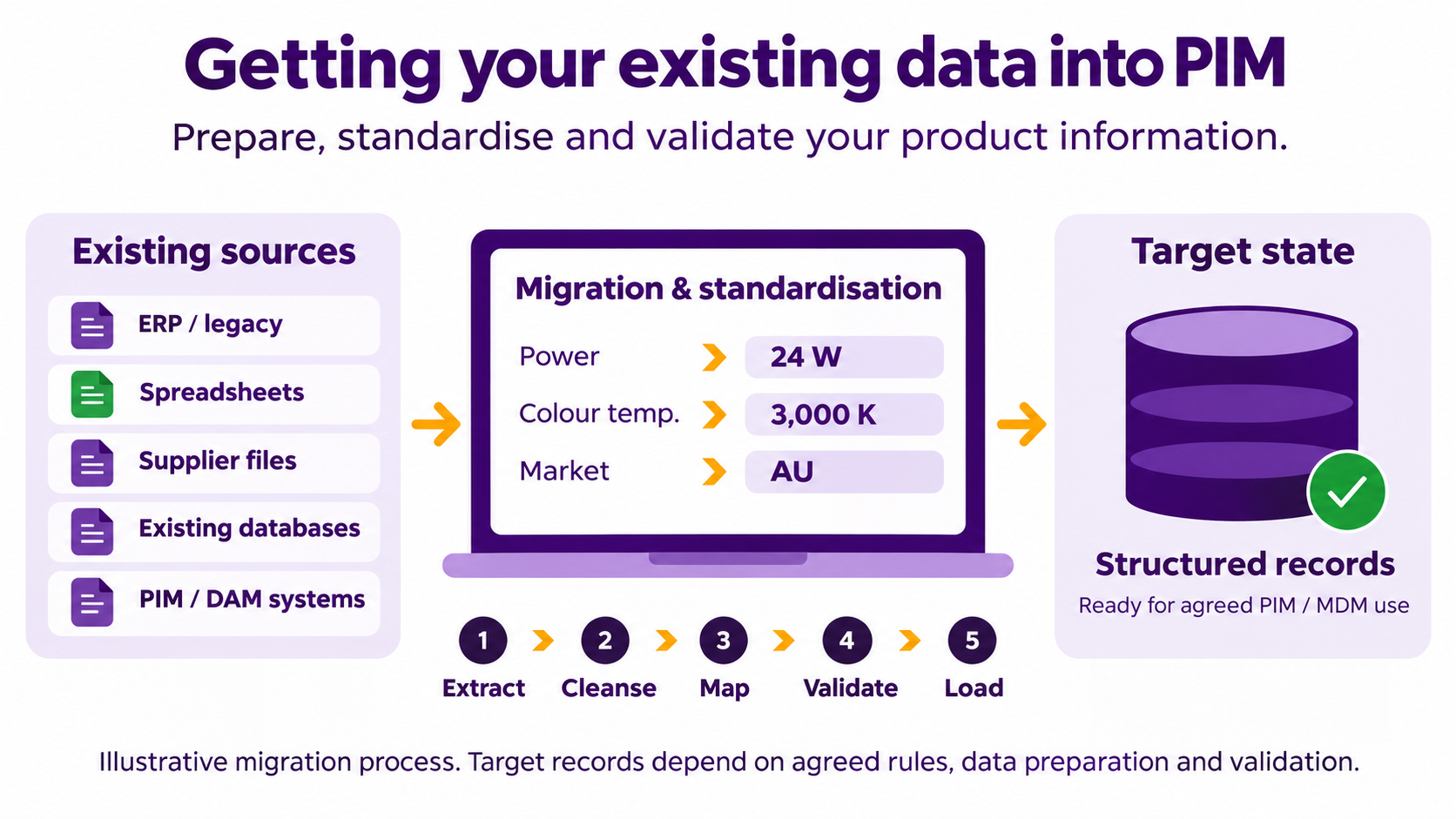
6. Prepare your data for migration
A new system will not automatically resolve unclear or inconsistent source information. Review the data before importing it.
Preparation commonly includes:
- Confirming unique product identifiers
- Identifying duplicate and obsolete records
- Standardising attribute names, units and allowed values
- Separating product families, variants and individual items
- Matching images and documents to the correct products
- Assigning unresolved issues to someone who can verify the information
You do not need to clean the entire catalogue before starting. Use the pilot range to establish rules, test the migration and estimate the work required for the remaining products.
7. Start with a representative pilot
Choose a product range that is manageable but includes enough complexity to test the proposed structure and workflow.
For example, an industrial distributor might begin with one equipment range, including its variants, accessories, manuals and technical specifications. The pilot could cover an ERP import, content approval, website publication and one distributor export.
Before expanding, check that:
- Records and relationships have migrated correctly
- Required information is validated before publication
- Users can complete their daily tasks
- Connected outputs receive the correct approved content
- Failed imports or exports are visible and can be resolved
- The team knows who owns each part of the process
Agree on these acceptance criteria before building the pilot, so everyone understands what a successful first stage means.
8. Plan for everyday use after launch
PIM needs ongoing ownership. Establish who maintains the product structure, manages user access, reviews data quality and handles integration issues.
Train people around the tasks they perform, such as onboarding a supplier, updating specifications, approving content or preparing an export.
Use the baseline measures from the start of the project to assess progress. Review where the system has reduced work and where users still rely on spreadsheets or manual workarounds.
Extend the solution as the first workflows become established. Later stages might add more product ranges, languages, distributor formats, digital channels or catalogue outputs.
Common PIM implementation mistakes
- Choosing from a generic demonstration: attractive screens do not show whether the platform handles your product relationships and exceptions.
- Underestimating data preparation: inconsistent source records still require decisions and verification.
- Leaving ownership unclear: teams need to know who maintains and approves each type of information.
- Trying to deliver every channel at once: a broad first release can delay useful results and make problems harder to isolate.
- Treating launch as the finish: support, maintenance and ongoing data management need a place in the plan.
Where do Pimcore and OpenDXP fit?
Pimcore and OpenDXP are platforms Stimulus uses to build connected product data solutions. We assess their suitability against the product structures, workflows, integrations and publishing requirements of each project.
A solution may combine PIM and MDM with digital asset management, websites, B2B portals and catalogue production. The scope should follow your business requirements and the outcomes agreed for each stage.
Compare the proposed implementation as well as the platform itself: what is included, what requires development or additional components, and how licensing, hosting, maintenance and support will work over time.
Planning your next step
Start by documenting one product information workflow that needs to improve. Bring together sample data, the people who maintain it and an example of the output you need.
That provides a practical basis for discussing scope, platform suitability and a manageable first release.
Stimulus helps Australian manufacturers and distributors plan and build connected product data systems. Explore our PIM and MDM capabilities and product data management solutions.
For challenges specific to supplier data and distributor networks, read PIM for distributors and wholesalers in Australia.