
What is Product Information Management (PIM)?
Last updated: 13 November 2026
Product Information Management (PIM) helps businesses organise, enrich and maintain the product information they share with customers, distributors and sales channels.
A PIM system brings product descriptions, technical specifications, variants and other product content into a central place. Teams can review and approve that information before publishing it to websites, eCommerce platforms, distributor feeds, datasheets and catalogues.
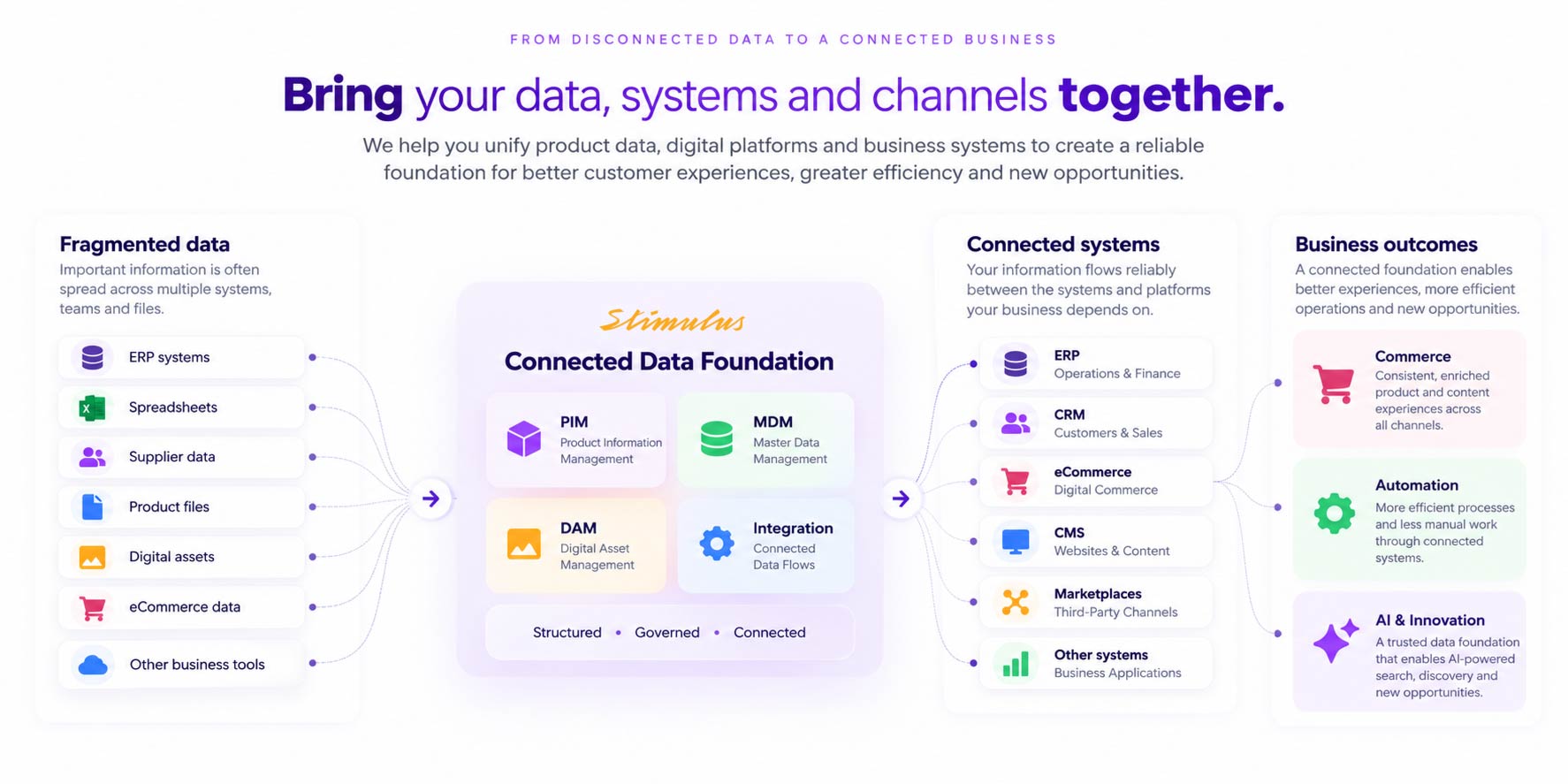
What does a PIM system do?
Product information often starts in several places: an ERP system, supplier spreadsheets, technical documents and files maintained by different teams. A PIM system brings these sources together and provides a structured way to prepare product information for use.
A typical product information workflow includes:
- Collect: import product records from ERP systems, supplier files and other sources.
- Structure: organise categories, attributes, variants and relationships between products.
- Enrich: add descriptions, specifications, translations and links to images or documents.
- Validate and approve: check required information and review changes before publication.
- Publish: deliver approved information to connected channels in the format each needs.
The exact workflow depends on your business, the platform and the integrations you put in place.
What information can you manage in PIM?
A PIM system can manage much more than a product name and description. Depending on your product range, it may include:
- Product codes, names and descriptions
- Technical specifications, dimensions, materials and performance data
- Categories and classification attributes
- Variants such as size, colour, capacity or voltage
- Accessories, compatible products, spare parts and replacements
- Packaging details and units of measure
- Translations and content for different markets
- References to product images, manuals, certificates and drawings
- Approval status and channel-specific completeness requirements
Not every field needs to originate in PIM. For example, your ERP may remain the authoritative source for product codes and pricing, while PIM manages technical and marketing content.
A practical example: update once, publish to several channels
Imagine a manufacturer introducing a new commercial refrigeration unit. The ERP contains its product code and transactional information. A supplier spreadsheet contains technical specifications, while manuals and photographs sit in shared folders.
With a connected PIM workflow, the product team brings those specifications into a structured record. Marketing adds the description, the technical team reviews the details, and the approved record links to the correct images and documents.
That information can then support:
- A product page on the company website
- A listing in a B2B ordering portal
- A product data export for distributors
- A downloadable technical datasheet
- A product catalogue
When a specification changes, the team updates the approved source record. Connected outputs can then receive the change through their configured integrations or publishing processes, reducing separate manual edits.
What are the benefits of PIM?
Less repetitive work
Teams spend less time copying information between spreadsheets, websites and documents. The same approved content can be reused across several outputs.
More consistent product information
Shared attributes, validation rules and approval workflows help teams identify missing, inconsistent or outdated content before it reaches customers.
Easier product launches and updates
Teams can see which products are ready for publication and which still need specifications, images, translations or approval.
Better information for buyers and sales teams
Clear specifications, compatible accessories and current documentation help people assess products and answer technical questions. These improvements can support purchasing decisions, although sales results also depend on pricing, demand and the buying experience.
How is PIM different from ERP, DAM and eCommerce?
These systems have different responsibilities and often work together.
- ERP: typically manages business transactions and operational data, including purchasing, stock, orders, invoicing and pricing.
- PIM: manages structured product information and prepares it for different audiences, markets and channels.
- DAM: manages digital assets such as photographs, videos, manuals and certificates, including versions, metadata and renditions.
- CMS and eCommerce: present content and products to customers. An eCommerce platform also handles shopping and ordering functionality.
For example, a B2B website might use product descriptions from PIM, images from DAM, and customer pricing and availability from ERP.
PIM does not normally replace stock control, checkout or marketing automation. Those functions depend on the relevant connected systems.
Who needs a PIM system?
PIM is particularly useful for manufacturers, distributors, wholesalers and retailers managing complex product ranges or several publishing channels.
Signs that your business may benefit include:
- Different teams maintain competing versions of product spreadsheets.
- Website specifications do not match datasheets or distributor records.
- New products wait for missing content or unclear approvals.
- Staff repeatedly prepare similar exports for different customers.
- Product variants, accessories and spare parts are difficult to maintain.
- Adding a market, language or sales channel creates substantial manual work.
Product count alone does not determine whether you need PIM. A smaller technical range with complex relationships can be harder to manage than a much larger range of simple products.
If you supply products through a distributor network, read our guide to PIM for distributors and wholesalers in Australia.
What is the difference between PIM, Pimcore and OpenDXP?
PIM describes the practice and systems used to manage product information. Pimcore and OpenDXP are platforms that can be used to build a PIM solution, alongside connected capabilities such as digital asset management and content management.
At Stimulus, we work with both platforms to structure product information, configure workflows and connect approved data with websites, portals, distributor exports and publishing processes.
The right choice depends on your product relationships, data ownership, approval requirements, existing systems and ongoing support needs. Available features and implementation costs depend on the selected platform, version, components and project scope.
Where should you start?
Start with a specific product information problem. For example, you might want to reduce the work involved in launching products, improve distributor exports or keep website specifications and datasheets consistent.
Identify where the information comes from, who maintains it and which outputs need it. A pilot using one representative product range can help establish the data structure and workflow before extending the solution.
Stimulus helps Australian manufacturers and distributors build connected product data systems, websites, portals and digital commerce platforms.
Explore our PIM and MDM capabilities or see how we approach product data management.